The Use and Principle of Current Transformer Acrel Support Olympic Winter Games Beijing 2022 Power Supply Solution for Winter Olympics Wireless Temperature Solution at Beijing Daxing International Airport Acrel Releases ADW300 with 333mV Access Energy meters used in urban comprehensive pipe gallery projects Working Principles and Wiring of Various Types of Electric Meters Digital Electric Energy Meter VS Electronic Electric Energy Meter Problems and Common Fault Analysis of Current Transformers During Operation Detection and Marking of Current Transformers The Functions and Working Principles of Current Transformers Application of DC Current Meters in Substation DC Measurement Operation Methods and Precautions of Current Transformers The Detection and the Open Circuit Fault Inspection of Current Transformers Models, Structures and Installation Methods of Different Hall Current Sensors The Working Principles of the DC Current Shunts How to Set the Temp and Humidity Controller? Precautions of Multifunction Meter Storage Principle and Characteristic Parameters of Hall Current Sensor Multi-function Instrument Definition and Troubleshooting The Use of Prepayment Energy Meter and Its Advantages over Induction Meter Basic Functions of Smart Prepaid Electricity Meter in Student Dormitories How to Use the Multi Function Energy Meter? What Functions Does It Have? Factors That Affect the Performance and Use Value of Prepayment Energy Meter Application of ​IoT Based Electricity Energy Meter Application of Wireless Temperature Sensor in Press What is the Significance of Smart Energy Meter Applications? Smart Energy Meter Application What Are the Common Faults of Current Transformers? Operation Precautions of Current Transformers and the Cause of Burning The Principle and Use of Through-core Current Transformers The Wiring Principle of Current Transformers Design Features of Wireless Temperature Sensors Errors of Daily Current Transformers

How to Set the Temp and Humidity Controller?


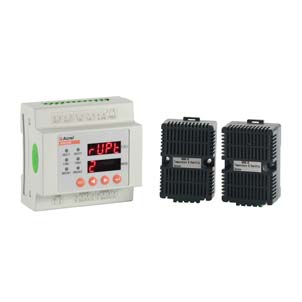
When the power-on reset shows that the temperature setting state is over, the temp and humidity controller enters the normal working state, the screen displays the current temperature value and humidity value, and switches the load according to the preset.


Ⅰ. How to set the temperature of the temp and humidity controller?


Press the function selection key to enter the setting state to modify the setting parameters. If press for 10 seconds with no action, it will automatically exit the setting state.


1. Press the function selection key on the temp and humidity controller to enter the temperature upper limit setting state. At this moment, the upper screen displays the set value and the lower screen displays "1-H". The upper limit can be set by increasing or decreasing, which is from -50°C to 99°C. The factory setting upper limit is 30°C.


2. Press the temp and humidity controller function key again to enter the temperature lower limit setting state. At this moment, the upper screen displays the set value and the lower screen displays "1-L". The lower limit can be set by increasing or decreasing, which is from -50°C to 99°C. The factory setting lower limit is 20°C.


For example, set the upper temperature limit to 40°C and the lower temperature limit to 20°C. The heat-up controller will be at ambient temperature. Start the load (such as heater, etc.) heating at 20°C and stop the load heating when the temperature is higher than 40°C to control the ambient temperature within 20~40°C. The fan cooling controller will start the load (such as fans) to cool down when the ambient temperature is higher than 40°C and stop the load cooling when the temperature is lower than 20°C, so as to control the ambient temperature within 20~40°C.


3. Press the function selection key on the temp and humidity controller again to enter the temperature correction state. At this moment, the upper screen displays the currently measured temperature value and the lower screen displays "1-C". The temperature value can be corrected by increasing or decreasing key, which is from -50℃ to 99℃. The temperature value has been calibrated at the factory and customers do not need to calibrate unless there are special circumstances.


Ⅱ. How to set the humidity of the temp and humidity controller?


1. Press the function selection key on the temp and humidity controller to enter the humidity upper limit setting state. At this moment, the upper screen displays the set value and the lower screen displays "2-H". The upper limit of humidity is set by the increase or decrease key, which is from 0[%]RH to 99[%]RH. The factory setting upper limit is 92[%]RH.


2. Press the function selection key on the temp and humidity controller again to enter the humidity lower limit setting state. At this moment, the upper screen displays the set value and the lower screen displays "2-L". The lower limit of humidity is set by the increase or decrease key, which is from 0[%]RH to 99[%]RH. The factory setting humidity lower limit is 82[%]RH.


3. Press the function selection key of the temp and humidity controller again to enter the humidity correction state. At this moment, the upper screen displays the currently measured humidity value and the lower screen displays "2-C". The humidity value can be corrected by the increase or decrease key, which is from 0[%]RH to 99[%]RH. The humidity value has been calibrated before leaving the factory and customers do not need to recalibrate unless there are special circumstances.


Then press the function selection key of the temp and humidity controller again to enter the parameter setting initialization state. At this moment, "S" is displayed. Press the increase key to display "S—", which means that all parameters are restored to the factory default values.


Press the function selection key of the temp and humidity controller again to exit the setting state and return to the normal working mode.


Related Articles about Acrel

Products

Products

Popular Acrel Energy Meter Products Recommended